ToolForge Redirector
Create redirect rules based on username or user role. No unnecessary settings, just predictable behavior.
Status: Active • Version: 0.1
Currently in early testing.
What it does
Redirect users when they visit a specific path on your site.
Rules match the URL, the current user, and their role or username. If all conditions match, the user is redirected to your chosen destination.
Example
Redirect subscribers who visit /dashboard to a custom welcome page.
Admins can continue accessing the original page normally.
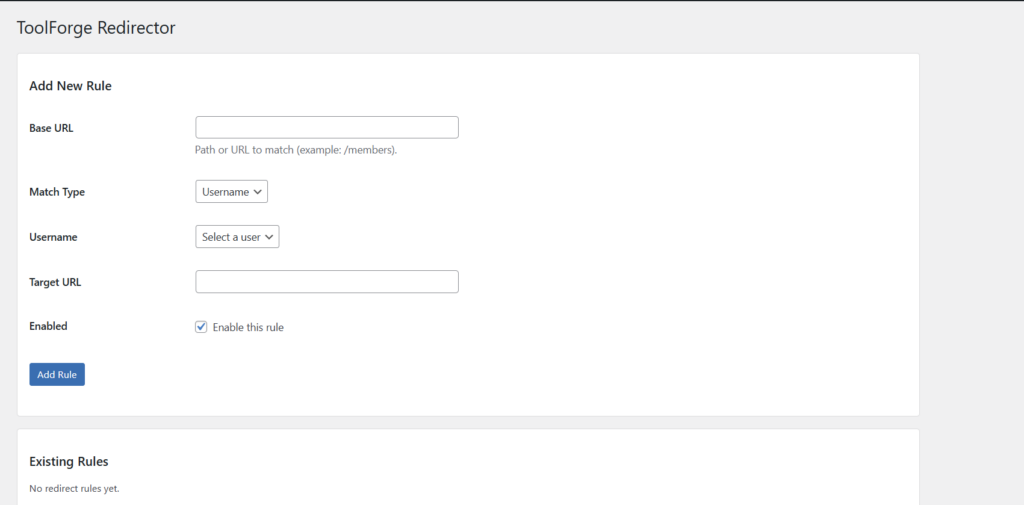
Simple login redirect rule management inside WordPress
Key Features
- Username-based redirects
- Role-based redirects
- Lightweight and fast
- Exact path matching (no unexpected behavior)
- Works alongside other plugins without interference
How to use
- Install and activate the plugin
- Go to Users → Login Redirect
- Add a new rule
- Set the base URL (example: /members)
- Choose match type (username or role)
- Select the user or role
- Enter the target URL
- Save the rule
Once enabled, matching users will be redirected automatically.
Notes
Redirects use exact path matching. /members will not match /members-area.
Query strings are ignored, so /members?tab=1 will still match /members.
Redirects only apply to logged-in users and do not affect admin pages, login screens, or background requests.
Access
This plugin is currently in early testing and is not publicly downloadable yet.
If you’d like to try it, get in touch or check back soon.