ToolForge Menu Visibility
Control which admin menu items users can see based on role or username.
Status: Active • Version: 0.1
Currently in early testing.
What it does
Control visibility of WordPress admin menu items for specific users or roles.
Rules match menu items against usernames or roles and hide them from the admin interface when conditions are met.
Example
Example
Hide plugin settings pages from non-admin users while keeping full access for administrators.
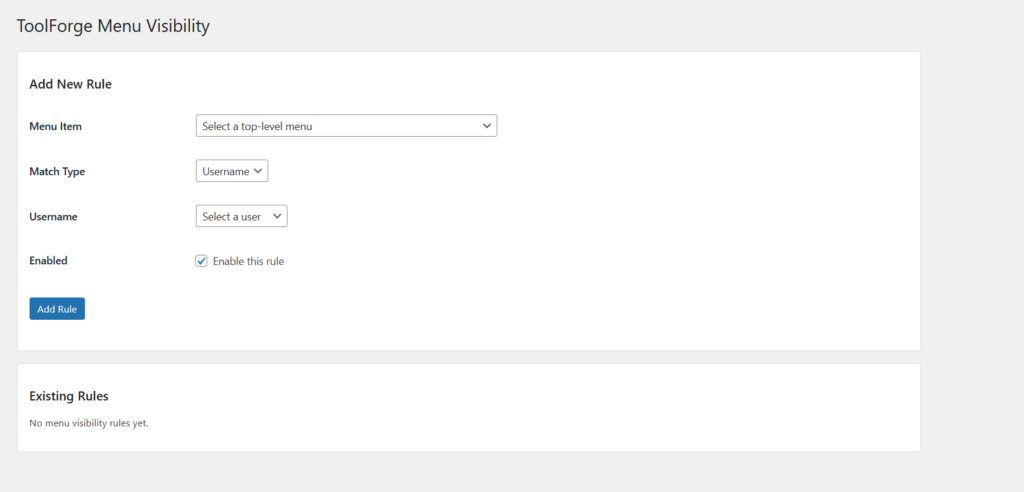
Simple login redirect rule management inside WordPress
Key Features
- Role-based menu visibility
- Username-based menu visibility
- Hide specific admin menu items
- Lightweight and predictable
- No impact on frontend or site performance
How to use
- Install and activate the plugin
- Go to Settings → Menu Visibility
- Add a new rule
- Choose whether to match by username or role
- Select the user or role
- Select the menu item to hide
- Save the rule
Matching users will no longer see the selected menu items.
Notes
Menu visibility changes only affect the WordPress admin area.
Hidden menu items are not accessible through navigation, but direct URL access may still be possible depending on permissions.
Rules are evaluated per user session and update immediately.
Access
This plugin is currently in early testing and is not publicly downloadable yet.
If you’d like to try it, get in touch or check back soon.